PROGRAMMING CORNER
Don’t Let Your Program Die:
Content Strategies that go beyond the flyer and fill library seats
If your library's attendance is dwindling, the problem might not be the program itself—it might be the 'flyer-and-forget-it' mentality. In a world driven by digital engagement, a single PDF on a bulletin board is no longer enough to compete for your community’s time. Too often, public libraries treat programming as a fleeting, one-off event rather than a continuous engagement opportunity. By shifting focus toward a robust content strategy—highlighting speakers, curated collections, and post-event media—libraries can transform single sessions into powerful recruitment tools for future attendance. This approach moves beyond the traditional flyer, utilizing dynamic storytelling to build lasting momentum and ensure every seat is filled.
Summer-Fall 2026 Edition
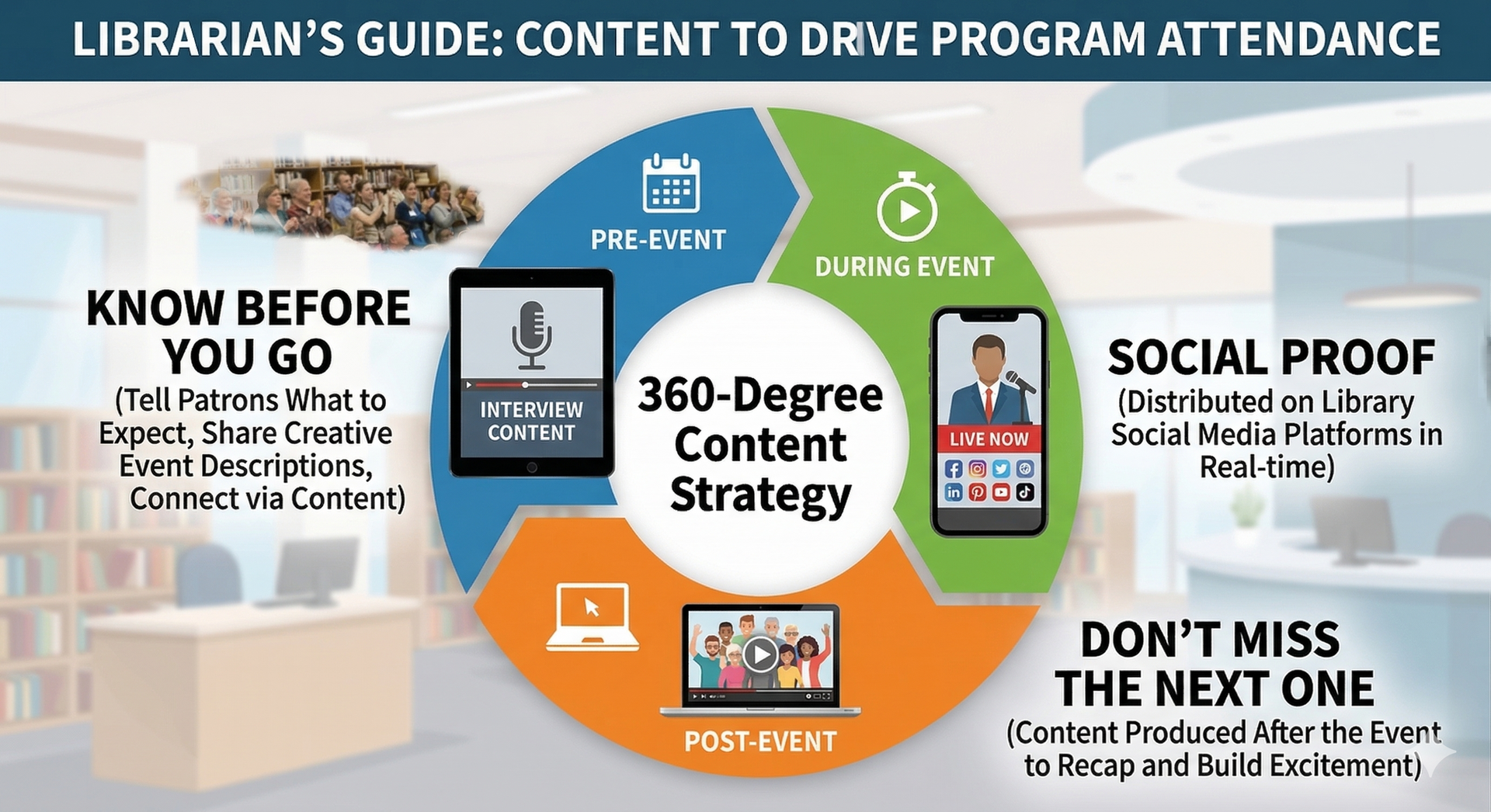
You booked the perfect speaker. You designed a beautiful flyer. You put it on the circulation desk. Yet, on the night of the event, the room is half-empty. The problem usually isn't the quality of the program; it is the narrative surrounding it. To consistently fill seats, libraries must shift from static announcements to a 360-degree content strategy. By creating a story that spans before, during, and after the event, you move patrons from passive observers to active participants.
Three Phases for Content Success
Phase 1: Pre-Event (Removing Barriers)
Attendance often suffers because of the "unknowns." Patrons are busy and committing an evening to something new feels risky. Your pre-event content must do two things: build hype and reduce anxiety.
The Comfort Content: Create "Know Before You Go" posts. A simple photo or short video showing parking availability, the room layout, or answering, "Is this okay for beginners?" removes the friction that stops people from clicking "Register."
The Human Connection: We trust people more than institutions. Instead of a generic bio, publish a mini interview with the artist. When a patron sees the presenter’s personality, the event transforms from a generic "library program" into a meeting with a friend.
Phase 2: During the Event (Social Proof)
While the program is happening, your content should validate the attendees' choice and broadcast success to the outside world. Sharing real-time clips—a packed room, a laughing audience, or a snippet of music—serves as "social proof." It tells the digital audience, "This library is alive, active, and the place to be right now."
Phase 3: Post-Event (The Bridge)
The event shouldn’t end when the lights go out. Post-event content is your most powerful recruitment tool for the next program. A high-energy highlight reel triggers "FOMO" (Fear of Missing Out). However, a recap is useless without a bridge. Every post-event photo should end with a call to action: "Wish you were here? Don't miss our next event on [Date]!"
How to Streamline the Process: A Step-by-Step Workflow
Implementing a comprehensive content strategy often feels overwhelming for library staff who are already juggling desk shifts, collection development, and program setup. The secret is not to work harder, but to batch your tasks and template your output. By organizing your marketing just like you operationalize your cataloging, you can produce high-quality content without adding hours to your workweek.
1. The "One-Call" Batch Protocol
Stop the endless back-and-forth email chains regarding logistics. Instead, schedule a single 20-minute video call (via Zoom or Google Meet) with your presenter or artist three weeks prior to the event. Structure this call strictly to handle two distinct phases:
Phase A: Logistics (First 10 Minutes): Confirm the technical requirements, room setup, and arrival time.
Phase B: Content Creation (Last 10 Minutes): Hit the "Record" button (ensure you are recording to the cloud for easy sharing). Ask the presenter to look directly at the camera lens—not their screen—and answer three specific questions: Who are you? What will the audience learn? Why should they come? Finally, ask them to record a 15-second "Teaser" clip specifically inviting your library's patrons by name (e.g., "Hello Freeport Library patrons...").
The Result: In one sitting, you have finalized your event planning and generated two weeks' worth of video content for Instagram Reels and Facebook Stories.
2. The "Plug-and-Play" Comfort Template
Don't design a new graphic for every single event. Anxiety about logistics ("Where do I park?" or "Is this strictly for adults?") is a major barrier to registration. To combat this efficiently, create a "Know Before You Go" Master Template in a tool like Canva.
The Design: Create a clean, branded graphic that features your library's logo and three distinct text boxes with icons: Parking/Arrival, Audience Level, and What to Bring.
The Workflow: For every program, simply duplicate this file and fill in the blanks. For example: "Parking: Use the East Lot," "Audience: Best for Ages 18+," and "Bring: Your own yoga mat."
The Benefit: This takes less than two minutes to update but provides the critical "comfort content" that convinces hesitant patrons to click "Register."
3. The "Designated Capturer" Delegation
As the program host, your job is to greet patrons, introduce the speaker, and troubleshoot technology. You cannot effectively document the event while hosting it. If you try to do both, one will suffer.
The Assignment: Designate a specific staff member, a trusted volunteer, or even a Teen Advisory Board member as the "Official Photographer."
The Tool: Hand them a physical clipboard with a printed "Shot List" (e.g., 1 Wide Shot of the Crowd, 1 Close-up of the Speaker, 1 Video of Applause).
The Specifics: Instruct them to focus on the reaction, not just the action. A photo of a patron laughing or taking notes is infinitely more powerful than a photo of a speaker standing behind a podium. Having a dedicated person ensures you get high-quality, usable assets without disrupting your own hosting duties.
4. The Pre-Written "Bridge" Post
The moment a program ends, you will be tired. You will be busy moving chairs and answering last-minute questions. You will likely not have the mental energy to craft a witty social media caption.
The Strategy: Draft your post-event content before the event even starts. Open your social media scheduling tool (like Meta Business Suite) in the morning and write a draft caption: "Tonight’s event with [Artist Name] was incredible! The energy in the room was electric. If you have FOMO (Fear Of Missing Out), don't worry—we are doing it again next month! Click the link to grab your seat for [Next Event Name]."
The Execution: Leave a placeholder bracket in the draft that says [INSERT PHOTO HERE]. As the event wraps up, simply grab the best photo from your Designated Capturer, drop it into the draft, and hit "Post" before you even leave the building. This ensures you capture the peak engagement window without the late-night stress.
By weaving this streamlined content strategy into your regular planning, you transform marketing from a frantic afterthought into a sustainable community-building engine. You no longer need to chase attendees with flyers; instead, you cultivate an engaged audience that feels personally connected to your library's narrative. Start by testing this workflow on just one upcoming flagship program to see how a small investment in storytelling yields a massive return in engagement. Ultimately, when you show patrons exactly what they are missing, you ensure that next month’s empty seats become this month’s waiting list.